First, a disclosure you already suspected: we make Charc. You should read everything below with that in mind, and we've tried to write the comparison we'd want to read anyway — the one that admits where the twenty-year-old incumbent is simply better. Scrivener is beloved for good reasons. Plenty of writers should stay with it, and we'll tell you who they are.
What they agree on
Both apps start from the same insight, which Scrivener pioneered: a novel is not a single long document. It's a structured project — scenes inside chapters inside acts, surrounded by characters, places, research, and notes that belong at arm's reach while you write. Both give you scene-level writing, a structural sidebar, somewhere to keep character and world material, versioned snapshots of your work, and an export/compile step that turns the project into a manuscript. If you've internalized Scrivener's mental model, Charc will feel familiar within the hour — the disagreements are about everything around that core.
Where Scrivener is stronger
Maturity. Scrivener has two decades of edge cases sanded down, a huge community, and an answer on some forum for every conceivable question. Charc is young and in open alpha — it moves fast and improves weekly, but if “boring and settled” is what you want from your tools, that's a real difference and we won't pretend otherwise.
Offline, native, and yours. Scrivener is a real desktop application. No internet, no problem — on a plane, in a cabin, during an outage, it works identically. Charc runs in the browser; an offline desktop app is on our roadmap, but today Scrivener wins this outright. Related: Scrivener is a one-time purchase (roughly $60 per platform) that never expires, and files live on your disk in a format you control.
Compile depth — though the gap is closing. Scrivener's compile system can produce nearly any output format with nearly any formatting rule — including Markdown and LaTeX — if you're willing to learn it. Charc now has its own version of the good part: reusable book formats (trim size, margins, typography) you can save once, share as files, and swap right in the export dialog without touching your project's own settings — with a live preview instead of compile-and-check. Export-time processing covers the classic compile chores too: straighten quotes, convert dashes, italics to underline for agents, and find-and-replace for variant editions, all applied to the exported file while your manuscript stays untouched. But if you live in per-section compile rules or academic output pipelines, Scrivener still goes deeper, and we'd rather say so.
iOS. Scrivener has a real iPad/iPhone app. Charc works in a mobile browser, but we won't claim that's equivalent.
Where Charc is stronger
The price of entry is zero, forever. Charc's core workspace — editor, outline, characters, sync, export — is free with no trial clock. Paid tiers add extras and fund the free tier; they don't hold the basics hostage. Against ~$60 per platform (and again for iOS), “open a tab and start” is a different universe of friction.
Sync that isn't your problem. Scrivener's cross-device story famously routes through Dropbox with a list of rules to follow and real consequences for breaking them — most long-time users have a conflicted-project story. Charc syncs automatically because it was born in the browser: close the laptop mid-sentence, open your desktop, keep typing. Your draft is wherever you are, with autosave, scene history, and server-side backups underneath it (and one-click local backups when you want a copy you hold).
Collaboration exists. Scrivener has none — sharing a project means taking turns or emailing zipped folders. Charc has co-authors with live presence, controlled read/edit access, margin comments, and a beta-reader mode where feedback comes back attached to the text. If another human ever touches your draft before publication, this category alone may decide it.
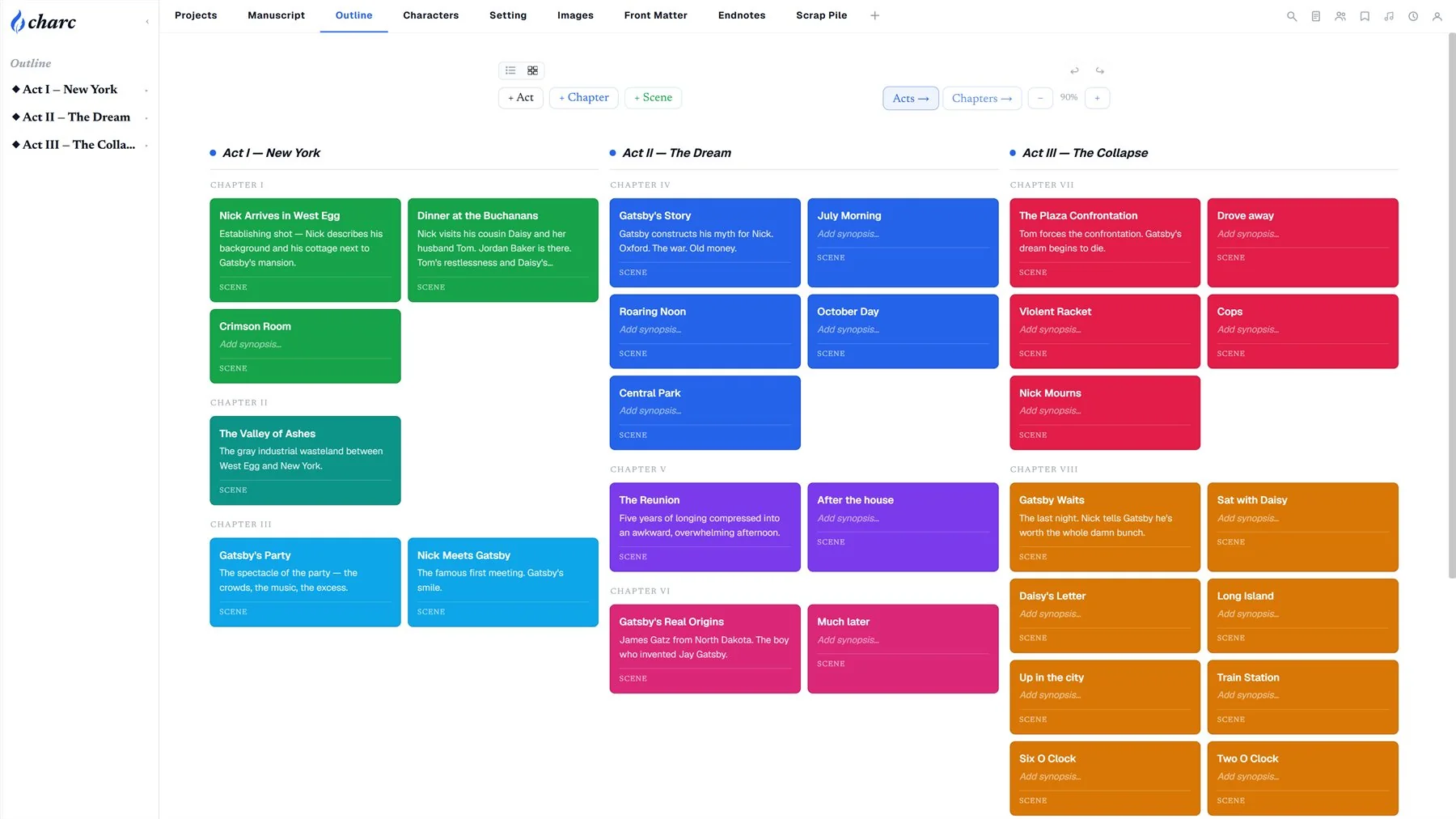
Planning is visual. Scrivener's corkboard was the original visual outliner, and it's still fine. Charc's outline flips between a structured list and a card board — acts side by side, color-coded scenes, drag to restructure, zoom until the whole book fits on one screen — and it's the same data as the manuscript, never a separate artifact to keep in sync.
Momentum is built in. Daily goals, streaks, per-chapter word targets, a progress dashboard with your cover on it, named phases for drafting and revision — Charc treats finishing the book as part of the product, not a spreadsheet you maintain elsewhere.
Versions you can actually see. Both apps have snapshots. Charc's compare mode highlights every added and removed word directly in your manuscript, side by side with the frozen version — the difference between having backups and having courage.
The book, not just the manuscript. Cover and front-matter design, decorative chapter headings, and a simulated e-reader preview before you export the EPUB. Scrivener can compile an ebook; Charc lets you see the book while you make it — and the PDF export is the full designed book, cover to back matter, paginated exactly as the page view shows it. It goes all the way to the printer, too: a print-ready interior PDF with bleed, and a full wraparound cover — back, spine, and front on one canvas, with the spine width calculated from your book's actual page count — exported at the exact dimensions KDP and IngramSpark expect. The same cover design exports as your ebook cover with one click. Scrivener has nothing in this category.
Citations are built in. Scrivener famously has no citation system — academics pair it with Zotero or EndNote and wrestle the results through compile. Charc stores your sources once and formats them as Chicago, MLA, or APA; you place citations from the reference panel with a click, page numbers and bibliographies stay in sync when sources change, and papers export submission-ready with the running headers and title pages each style expects. If you write essays or research alongside fiction, this is a whole workflow Scrivener simply doesn't have.
The learning curve. Scrivener is the app with a cottage industry of paid courses explaining it. Charc's goal is that you never need a tutorial for the core loop: project, outline, write, export. (We wrote a five-minute tour; that's roughly the whole onboarding.)
Side by side
| Charc | Scrivener | |
|---|---|---|
| Price | Free core, forever; optional paid tiers | ~$60 one-time per desktop platform; iOS separate |
| Platform | Browser (any OS); desktop app on roadmap | Native macOS & Windows; iOS app |
| Offline | Keeps working through a lost connection, syncs on return; not a fully offline app | Fully offline |
| Sync | Automatic, built in | Via Dropbox, with care |
| Collaboration | Co-authors, presence, comments, beta readers | None |
| Outlining | List + card board views, same data as manuscript | Binder + corkboard + outliner |
| Versions | Snapshots + word-level compare in the manuscript | Snapshots per document |
| Export | DOCX, EPUB, full-book PDF, print-ready PDF with bleed; reusable format presets; export-time cleanups & find-and-replace; e-reader preview | Deepest compile system available; most formats |
| Print covers | Wraparound cover designer (back/spine/front), auto spine width, KDP/Ingram-ready PDF + ebook cover | None |
| Import | Scrivener projects (.scriv) & Word manuscripts, structure included | Word, plain text |
| Citations | Chicago, MLA & APA built in — click-to-cite, live bibliographies, paper exports | None built in; pair with external tools |
| Progress tools | Goals, streaks, targets, phases, dashboard | Session targets |
| Learning curve | Minutes for the core loop | Famously steep; courses exist |
| Maturity | Open alpha, fast-moving | 20 years, battle-tested |
Who should stay with Scrivener
- Writers who work offline often, or want their manuscript to never depend on a connection or a company
- Compile power users with finely tuned output formats they'd have to rebuild
- iPad-first writers
- Anyone allergic to alpha software — fair, and we'd rather say it than have you find out annoyed
Who should try Charc
- Writers who bounced off Scrivener's learning curve — or never bought it because of the price
- Anyone writing on more than one machine who's tired of sync ceremony
- Co-authors, and writers who use beta readers or editors during drafting
- Visual planners who think in boards, colors, and cards
- Writers motivated by streaks, targets, and watching the book take shape
- Anyone who wants to design the finished book — covers (including the full print wrap), chapter art, EPUB — in the same tool they draft in
- Scrivener owners curious enough to try the importer on a copy of their project — it's a ten-minute experiment now, not a weekend
Trying it costs nothing — literally
And switching is no longer an afternoon of pasting: Charc now imports Scrivener projects directly. Point it at your .scriv folder (or a zip of it) and the binder structure arrives as acts, chapters, and scenes, with synopses attached and your Characters and Places folders landing as entity tabs — Scrivener 3 and older Windows projects both work. Word manuscripts import too, with chapter detection. So you don't need to commit to find out. Charc is free and runs in a tab: open it, import your current project — or just outline a chapter fresh — and see which tool your hands reach for next week. That experiment is the only comparison that actually matters, and it's the one no blog post — ours included — can run for you.