Charc will happily behave like a plain word processor. Open a scene, type, close the tab — nothing else is required, and plenty of writers work exactly that way.
But the app was built around how novels actually get made: in layers, out of order, with cold feet before every big decision. The features exist to absorb that mess. Used together, they change how the work feels — and most of them cost seconds, not minutes.
Here are the ten habits we see in writers who get the most out of it.
1Outline light, then let the outline follow the draft
You don’t need a forty-beat plan to start. Create your acts, rough in some chapters, and give each scene a one-line synopsis — a sentence about what changes. That’s enough structure to navigate by.
Then treat the outline as a living document. When the draft surprises you (it will), update the synopsis after the fact instead of fighting to make prose match a plan you wrote a month ago. The Outline and Write tabs share the same scenes, so there’s nothing to keep in sync — retitle a scene in one place and it’s retitled everywhere.
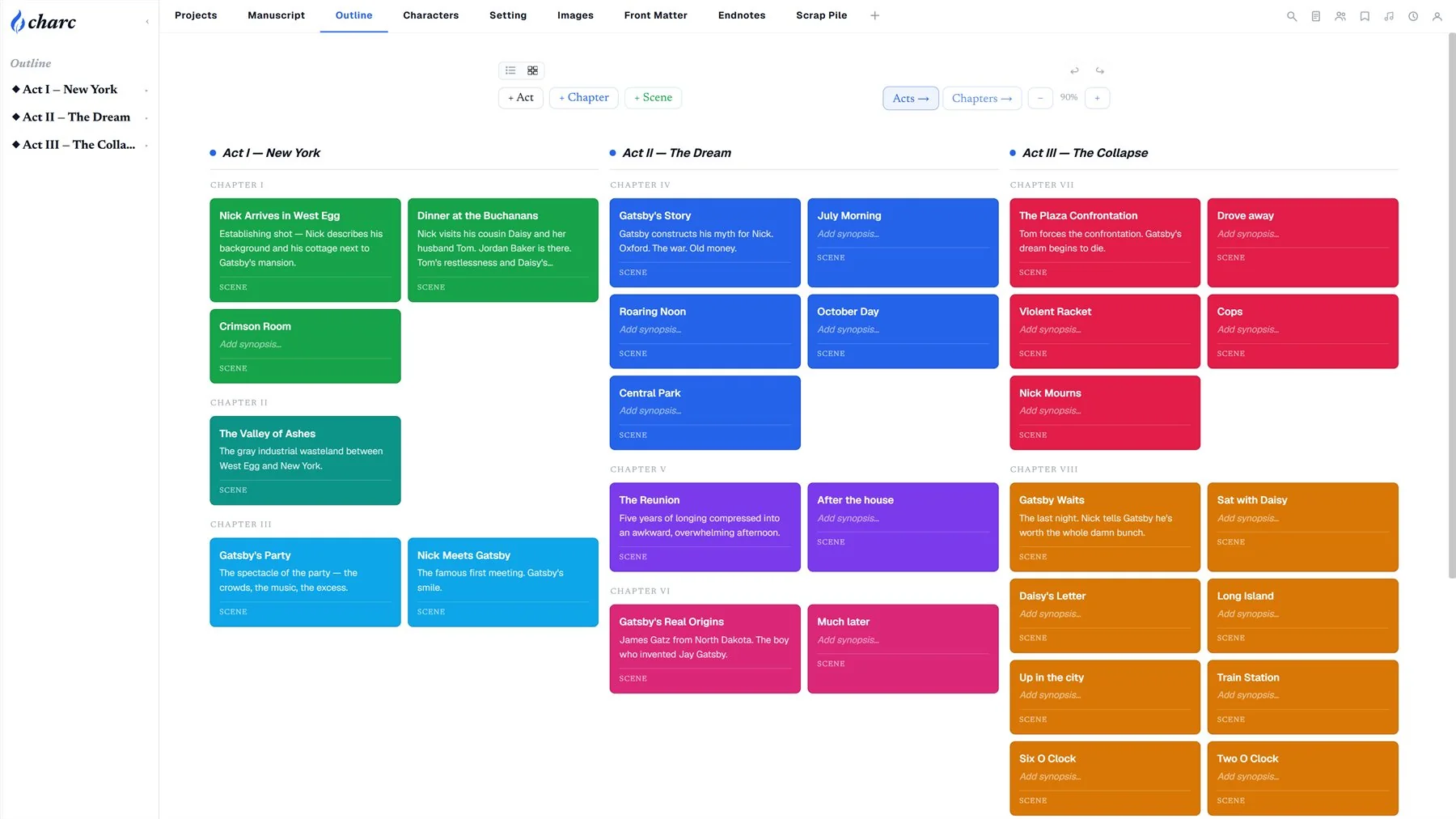
When you want the bird’s-eye view, flip the outline into card view and lay your acts side by side. Color the scenes that need attention. Zoom out until the whole book fits on one screen.
2Snapshot before every big decision
About to gut chapter three? Rewrite the ending in a different POV? Take a snapshot first — and name it something honest, like “Before I ruin the ending.”
A named snapshot is a full copy of your manuscript frozen at that moment. Later, open compare mode and Charc highlights every added and removed word directly in your manuscript, side by side with the frozen version. Half the value is practical — you can always walk it back. The other half is psychological: rewrites stop feeling like demolition. You’re not destroying the old version. It’s right there.
Charc autosaves continuously regardless, but autosaves record time. Snapshots record intent.
3Cut to the Scrap Pile, never delete
Every writer knows the paralysis of a paragraph that isn’t working but might be needed someday. In Charc, that decision is free: send it to the Scrap Pile. Scenes, blocks, whole sections — scrapped material sits in its own tab, searchable and restorable, forever.
Kill your darlings without a funeral. You can always dig them back up.
4Give every recurring character a sheet before chapter five
Not a biography — a sheet. Three fields is plenty to start: what they look like, what they want, how they talk. Add a portrait if you have one. For your leads, add an Arc block and sketch their change across the story in four or five steps.
This feels like overhead in chapter two, when you know everyone. It pays off in chapter nineteen, when you can’t remember whether the innkeeper had a beard, and compounds again in book two. The same goes for places — the Setting tab works identically.
5Pin your reference before a writing session
Make it a pre-flight ritual: before you draft a scene, pin what the scene needs to the reference panel. The POV character’s portrait. The outline card for the chapter. The arc step you’re writing toward. A note with the three things this scene must accomplish.
Now everything you’d otherwise tab away to check is sitting beside your prose. Leaving the manuscript to “quickly look something up” is the most expensive habit in writing — the panel exists to make it unnecessary.
6Set a daily goal you can hit on a bad day
The word-count goal in your topbar should be embarrassingly achievable — 300 words, not 2,000. Streaks are built on bad days; any goal you can only hit on good days is a streak-ending machine. On the days the writing flows, you’ll blow past the number anyway, and nobody has ever stopped at 300 because the bar filled up.
7Use phases to name what you’re actually doing
The Progress page lets you define phases — prewrite, draft, revision — and mark one as current. The practice here is honesty: if you’ve secretly stopped drafting and started revising chapter one for the fourth time, the phase card knows. Naming the phase you’re actually in is a quiet accountability tool, and watching a phase get marked complete is one of writing’s rarer pleasures.

8Write in writing view, judge in page view
Writing view is a scroll of scenes — frictionless, structural, made for producing words. Page view typesets those same words onto real pages, with your margins, running headers, and chapter openings.
The practice: draft in writing view, and when a chapter is done, read it in page view. Something about seeing your prose as a book — page breaks, a proper heading, your name in the running header — makes weak paragraphs visible in a way the editing scroll never does. For the final gut check, open the e-reader preview and read it the way a reader will.
9Set your manuscript language and let the tools follow
If you write in German, French, Spanish, Italian, Portuguese, or Dutch — or you’re just picky about typography — set your manuscript language in Project Settings. Spellcheck switches dictionaries, smart quotes start producing your language’s correct marks („so“ in German, « comme ça » in French), and your EPUB and DOCX exports carry the right language metadata so e-readers and Word behave properly. One dropdown, once, and every tool downstream falls in line.
10Keep local backups
Let’s be clear about what Charc already does on its own: your work is autosaved as you type, your scene history is versioned, your snapshots are stored alongside your working draft, everything syncs to the server, and the server itself keeps continuously replicated backups. Multiple copies of your book exist at all times without you lifting a finger.
Keep a local backup anyway.
Not because you’ll need it — because of what it does for your head. One click on the Progress page exports a .charc file: your entire project, self-contained, sitting in your own downloads folder, on your own machine, owned entirely by you. No account required to matter, no company required to exist. Writers who keep a local copy stop thinking about their tools and worry about their sentences instead. Thirty seconds whenever you finish something you’d hate to lose — a chapter, an act, a draft — buys a peace of mind that’s hard to price.
.charc file in your downloads folder (yours, forever).
The meta-practice
None of this is homework. The point of every habit above is that the tool should disappear — the outline navigates itself, the reference panel remembers for you, the snapshots make courage cheap, and the backups let you forget the machinery entirely.
Pick the three practices that fit how you already work and ignore the rest. The only thing that has to be hard is the writing.